Businesses use iPad Pro at conferences and brand activations for six main jobs: attendee check-in, lead capture, interactive product demos, live sketching, visitor feedback and digital catalogues. Its large display, fast processor and Apple Pencil support let a single tablet handle a queue of people or a creative session without lag. Setup is simple too, which matters when the doors open in an hour.
Buying a stack of tablets for a two-day show rarely makes sense, which is why many exhibitors turn to iPad Pro rental instead. You get current hardware, matching units and a clean handover, then everything goes back once the stand comes down. Below are six ways teams put these tablets to work, plus the setup habits that keep things calm on the day.
What Can You Do With an iPad Pro at a Conference?
You can run check-in, capture leads, demo products on a big touch screen, sketch ideas live, collect visitor feedback and share digital brochures. One device covers all six, and a saved configuration lets staff swap between roles in seconds.
What Is an iPad Pro, and Why Does It Suit Live Events?
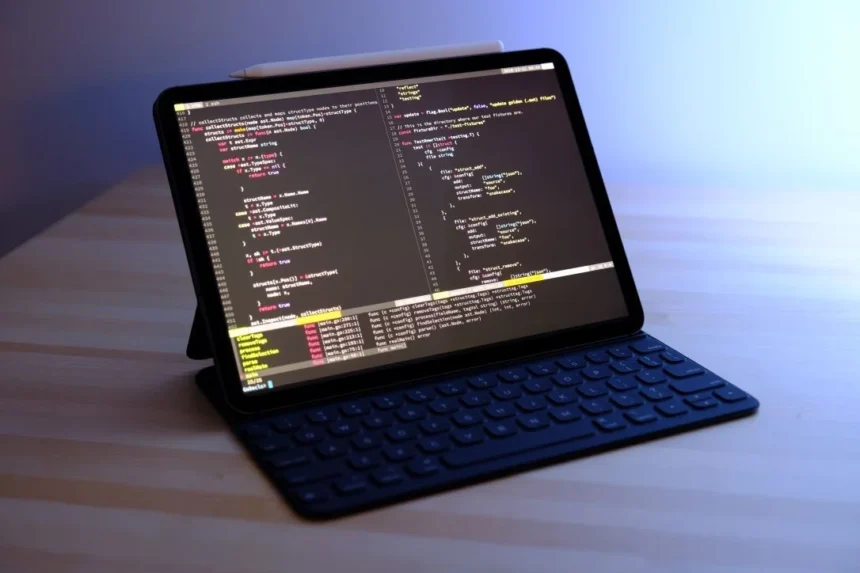
iPad Pro is Apple’s top-tier tablet, built around a fast processor, a bright high-quality display and support for Apple Pencil and keyboard accessories. That mix makes it a practical event tool rather than a gadget.
Hall lighting is rarely kind to screens, and a bright display stays readable. Battery life usually lasts a busy show day with moderate use, and cellular models keep working when venue Wi-Fi struggles. Plenty of crews choose iPad Pro hire for these reasons alone.
Sourcing comes first, though. Event managers who need tablets for a few days would usually rather rent an iPad Pro for business use than own the kit, and a provider such as The Tekk Group can supply units that arrive charged and configured.
1. Fast Check-In and Badge Scanning
Long queues set a poor tone before anyone has seen your stand. An iPad Pro running a check-in app scans QR codes, confirms names and prints or sends a badge in seconds.
Teams that pick iPad Pro rental for events often place two or three units at the entrance, so a single glitch never stops the line. Mount them on stands at a comfortable height and keep a spare at the registration desk.
2. Lead Capture That Staff Actually Use
Paper forms get lost, and handwriting is hard to read. A simple lead capture form on the tablet records contact details, interests and a quick note, then syncs to your CRM.
Keep the form short. Name, email and one qualifying question will beat a long survey every time, and staff can finish it while the conversation is still warm.
3. Interactive Product Demos
Visitors remember what they touch. Load a guided demo, a 3D model or a configurator onto the tablet and let people explore it themselves. The large screen suits small groups gathered around a table.
For trade shows, iPad Pro hire for exhibitions lets you show the same demo on matching devices across multiple stands, so every team presents it the same way.
4. Live Sketching and Creative Sessions
Few things draw a crowd like someone sketching in real time. A designer with Apple Pencil can draw portraits, illustrate talks as they happen or co-create artwork with visitors, then share the finished piece by email or QR code.
Agencies and studios often arrange iPad Pro rental for creative work when they need drawing and design tools on site without moving their own equipment.
5. Instant Visitor Feedback
A feedback kiosk near the exit catches opinions while they are fresh. Use a single tap rating and one open comment box, and visitors will happily respond.
Lock the tablet into one app using Guided Access or your device management tool, so nobody wanders off into the settings menu.
6. Digital Catalogues and Take-Home Content
Brochures end up in hotel bins. A digital catalogue on the tablet lets visitors browse products, watch a short video and send the details to their own inbox.
You can update spec sheets or product lines mid-event without reprinting a thing, which is a quiet advantage when plans change on day one.
iPad Pro vs Laptop vs Print: How They Compare at Events
Each option has a place on a stand, but they do different jobs. This table shows where the tablet pulls ahead.
| Factor | iPad Pro | Laptop | Printed material |
| Portability on a busy stand | Light and easy to hand over | Bulky, needs a table | Very light |
| Visitor interaction | Touch, pen and video | Keyboard and trackpad | None |
| Setup on the day | Minutes with a saved profile | Slower to prepare | None, but cannot be updated |
| Creative and live content | Strong, with Apple Pencil | Possible, less direct | Not possible |
How to Set Up iPad Pro Units for an Event
Here is a reliable order of work, whether you are managing two tablets or twenty.
- Define the job. Decide whether each device is a check-in station, demo unit or feedback kiosk.
- Build one master setup. Install apps, sign in with work accounts and set the home screen.
- Copy it across. Use device management so every unit matches. For larger fleets, bulk iPad Pro rental from one provider keeps models identical.
- Lock it down. Enable single-app mode, passcodes and remote wipe.
- Test on site. Check Wi-Fi, charging points and app behaviour in the real venue.
- Pack the extras. Stands, cases, cables, power banks and a printed support number.
A short term iPad Pro rental works best when delivery and collection dates are agreed early, because venues often limit loading windows.
Frequently Asked Questions
1. What can an iPad Pro be used for at a conference?
Common uses include attendee check-in, lead capture, product demos, live sketching, feedback collection and digital brochures. One tablet can handle several of these roles.
2. Is the iPad Pro better than a standard iPad for events?
For demanding demos, video and drawing, yes. For simple check-in or surveys, a standard iPad is often enough.
3. How do I stop visitors leaving the app on a kiosk?
Use Guided Access on the device or single-app mode through a device management tool. Both limit the tablet to one app.
4. How far ahead should I arrange tablets for an event?
Allow a few weeks for larger groups so apps, accounts and delivery can be tested. Smaller orders need less lead time.
5. Can iPad Pro work without venue Wi-Fi?
Yes, if the app works offline or the tablet has cellular. Always test your exact workflow before the event.
6. Which accessories are worth bringing?
Stands or mounts, protective cases, spare charging cables, power banks and Apple Pencil for creative stations.
Final Thoughts:
The best event tablets are the ones with a clear task, a locked-down setup and a tested connection. Start with one or two ideas from the list and build from there. For teams that want tidy delivery and preconfigured devices, The Tekk Group offers a dependable route, with equipment that arrives ready for the show floor.