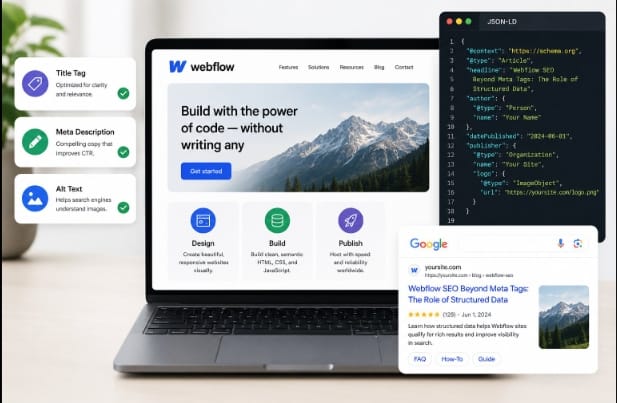
Ask ten Webflow designers what “SEO setup” means and nine of them will list the same three things: title tags, meta descriptions, and alt text. Fair enough – those are the basics, and skipping them is a mistake. But there’s a layer underneath all of that which gets the same attention, and it’s arguably doing more heavy lifting in how Google actually reads and displays a page.
That layer is structured data. It’s the reason some search results show star ratings, prices, or FAQ dropdowns while others sit there as plain blue text. Webflow rich snippets come directly from this code, not from clever copywriting in the meta description field.
This piece walks through what structured data is doing behind the scenes, why Webflow sites specifically tend to miss it, and what a reasonable implementation looks like.
Meta Tags Tell Half the Story
A title tag and description can convince someone to click, sure. But they don’t tell a search engine whether the page is a product, a recipe, an event listing, or a piece written by a specific author with credentials. Google has to infer that from context, and increasingly, it doesn’t want to infer anything. It wants a labeled, machine-readable answer.
Structured data, built on the Schema.org vocabulary and written in JSON-LD, spells out exactly what an entity is: this is a Product, its price is X, its rating is Y, reviewed by Z number of people. No guessing required. A page can be beautifully written and still get treated like a generic result if nothing in the code confirms what it actually contains.
Why This Trips Up a Lot of Webflow Builds
Webflow’s CMS is genuinely good for building fast, flexible sites, but it doesn’t hand out rich schema for free. A blog post might get basic Article markup baked into a template, but AggregateRating, Product, or LocalBusiness schema? That usually has to be added by hand or through a tool built for the job.
So a Webflow store selling physical products, or a service business with dozens of location pages, can end up with a site that looks polished but reads to Google as pretty flat, no ratings, no pricing signals, none of the extra context that pushes a listing toward a rich result.
A basic Product markup block, added through Webflow’s custom code embed, looks something like this:
{
“@context”: “https://schema.org”,
“@type”: “Product”,
“name”: “Example Product Name”,
“url”: “https://example.com/products/example-product”,
“image”: “https://example.com/images/example-product.jpg”,
“description”: “A short, accurate description of the product.”,
“brand”: {
“@type”: “Brand”,
“name”: “Example Brand”
},
“aggregateRating”: {
“@type”: “AggregateRating”,
“ratingValue”: “4.6”,
“reviewCount”: “128”
}
}
The CTR Argument, With Real Numbers Behind It
Organic search data found the top-ranked result in a given niche can capture close to 40% of all clicks, with second and third place falling off sharply after that, so anything that helps a listing stand out near the top carries real weight. Sites gain 30% more organic traffic after adding structured markup, largely because a rating or price shown directly in search competes better against listings that don’t show anything extra.
AI Overviews and chat-based search tools don’t read pages the way a person does, they pull from labeled data. A page without clean schema is easier for these systems to skip over entirely, since there’s nothing structured to cite.
Actually Getting Schema Onto a Webflow Page
There isn’t a schema tab sitting inside Webflow’s designer, so this comes down to two realistic paths. One is writing JSON-LD manually and pasting it into a page’s custom code section, fine for a handful of static pages, painful for a CMS collection with hundreds of items that all need individual markup. The other is using a schema markup generator that hooks into the CMS and keeps the markup current as content changes, which matters most for catalogs, listings, or blogs that get updated often.
Google’s Rich Results Test and the Schema Markup Validator will flag missing fields or broken syntax, and a lot of “why isn’t my rich snippet showing” problems trace back to skipping this step.
A Few Things Worth Watching
Some patterns show up over and over on Webflow sites: markup describing content that isn’t actually visible on the page, review numbers that don’t match what customers really left, or schema that falls out of sync after a CMS field gets renamed. Google has gotten stricter about review and rating markup specifically, so accuracy isn’t just good practice anymore, inflated ratings can get a page’s rich result eligibility pulled entirely.
Where This Leaves Things
Meta tags still deserve attention. But treating them as the whole SEO job leaves a lot on the table. Structured data is what actually tells search engines and AI tools what a page contains, and for Webflow sites, closing that gap tends to be the difference between a listing that blends in and one that doesn’t.
Frequently Asked Questions
1. Does Webflow support schema markup on its own?
Only partially. Custom code embeds let JSON-LD be added manually, but Webflow doesn’t generate most advanced schema types automatically.
2. What’s the quickest way to add schema across a large CMS collection?
A schema markup generator that syncs with CMS fields saves a lot of manual work compared to writing JSON-LD for each page.
3. Will rich snippets guarantee a ranking boost?
Not directly. They improve click-through rate and visibility, but Google doesn’t treat them as a standalone ranking factor.
4. How is structured data different from a meta description?
A meta description is written for people to read; structured data labels specific facts – price, rating, author, so machines can interpret them exactly.
5. Can incorrect schema actually hurt a site?
Yes. Incorrect or misleading schema markup can cause Google to ignore your structured data or make your pages ineligible for rich results. In cases of structured data spam, Google may also take a manual action.