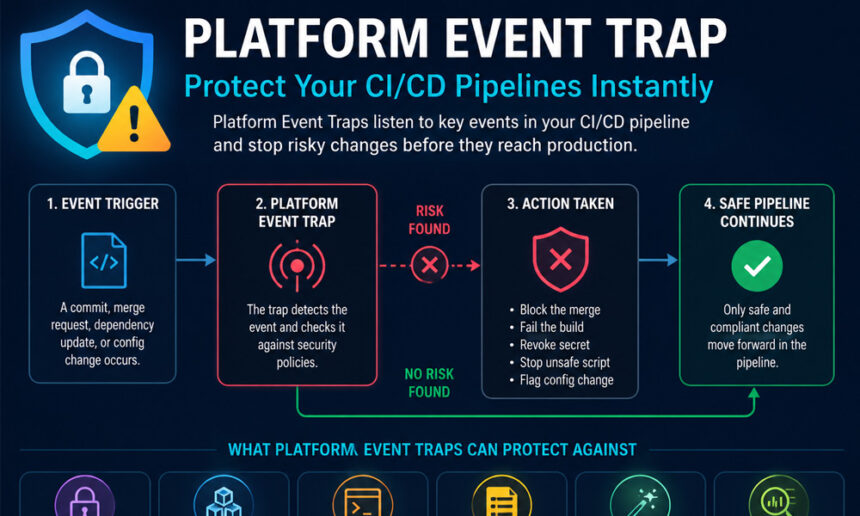
A Platform Event Trap is a tool that listens to what happens in your CI/CD system. Whenever something unusual or risky occurs, it reacts instantly.
For example, if someone adds a package with a known security problem, the trap stops the merge. If a secret key is accidentally committed, the trap cancels the pipeline. Even unsafe commands in scripts or Dockerfiles can be blocked automatically.
Unlike waiting for human reviews, which can be slow or miss things, Platform Event Traps work in real-time. They make sure unsafe changes never reach production. This keeps your code and systems safe, and developers get immediate feedback to fix issues.
Why Your CI/CD Pipelines Need a Platform Event Trap
Modern pipelines move extremely fast. A team might have hundreds of commits, builds, and deployments every day. Without proper safeguards, even small mistakes can become big problems.
Imagine this: a developer accidentally commits an AWS API key. Or someone adds a library with a known vulnerability. Without a trap, these problems could reach production, leak data, or cause costly downtime.
A Platform Event Trap stops these issues instantly. It keeps your pipelines safe while allowing your team to move fast. With automatic enforcement, you don’t have to rely only on human checks, which can sometimes fail.
How Platform Event Trap Works Step by Step
The main idea of a Platform Event Trap is simple: it watches events in your CI/CD pipeline and reacts immediately. Here’s how it usually works:
-
Detect Events: It monitors commits, pull requests, dependency updates, and config changes.
-
Check Against Rules: Each event is compared to security rules.
-
Block Unsafe Actions: If an event is risky, the trap blocks it.
-
Provide Feedback: Developers see the problem instantly and get suggestions to fix it.
This approach ensures unsafe code never reaches production, and the team can fix issues right away. It’s like having a smart assistant watching over your pipeline, stopping problems before they happen.
Platform Event Trap for Secrets Protection
One of the most important jobs of a Platform Event Trap is to protect secrets.
Secrets can include API keys, passwords, or tokens. If these get into code or logs, they can be stolen and cause major damage.
The trap scans commits for secret patterns. If it finds one, it cancels the pipeline immediately. Some tools even revoke the exposed secret automatically.
For example, imagine a developer accidentally commits a Stripe API key. The trap blocks the merge and alerts the developer to replace it. The secret never reaches production or logs, keeping the system safe.
Platform Event Trap for Dependency Safety
Dependencies, like npm packages or Python libraries, can introduce security risks if they contain vulnerabilities.
A Platform Event Trap checks new dependencies before they are added to your pipeline. If it finds a known security flaw, it blocks the merge.
This prevents dangerous code from entering your pipeline and protects production systems. For example, if a library with a known CVE is added to package.json, the trap stops the pipeline until the issue is fixed.
By doing this automatically, teams save time and avoid serious security problems.
Platform Event Trap for Dangerous Scripts
Another common problem is unsafe scripts. Commands like curl | bash or unverified shell scripts can harm your build or production environment.
A Platform Event Trap can detect these scripts instantly. When a risky command is found, the build fails automatically, preventing unsafe code from executing.
For example, if someone tries to run a script that downloads and runs unknown code, the trap stops it immediately. This keeps your pipeline secure and avoids accidental damage.
Platform Event Trap for Pipeline Configs
Even configuration files in CI/CD pipelines can be risky. If someone tampers with workflow files or pipeline scripts, it could bypass security checks or create errors.
Platform Event Traps monitor these files and block any unauthorized changes. Only trusted, reviewed configurations are allowed to continue.
For instance, if a developer tries to modify a GitHub Actions workflow to skip a security scan, the trap will reject the change. This ensures your pipeline stays consistent and safe.
AutoFix and Developer-Friendly Feedback
A Platform Event Trap doesn’t just block problems—it can also help fix them.
Many tools offer AutoFix suggestions. For example:
-
Update a vulnerable dependency to a safe version.
-
Remove an exposed secret automatically.
-
Fix unsafe code patterns in templates or scripts.
This way, developers aren’t stuck with a red ❌ error. They get a suggested fix and can continue working quickly. It improves workflow and keeps teams productive.
Reducing Noise with Reachability Analysis
Security tools are helpful, but sometimes they create too many alerts. When developers see hundreds of warnings, it becomes hard to know which ones actually matter. This problem is often called alert fatigue.
This is where reachability analysis becomes useful. Instead of flagging every possible issue, it checks whether a vulnerability can actually be reached and used in real code. If the risky code is never executed, the threat may be much lower than it first appears.
Think about a library that contains a known security flaw. If your application never uses the affected part of that library, the risk may be limited. Reachability analysis helps teams focus on the issues that truly need attention.
This makes a Platform Event Trap even more effective. Developers spend less time sorting through unnecessary alerts and more time fixing real problems. The result is better security and a smoother workflow.
Best Practices for Using Platform Event Traps
A Platform Event Trap works best when it is part of a clear security plan. Simply installing a tool is not enough. Teams need good habits and smart processes as well.
First, design your systems with asynchronous processing in mind. Events may not always happen instantly. Build workflows that can handle short delays without causing problems.
Second, create strong error handling. If an event fails, the system should know what to do next. Logging, alerts, and retry options help prevent small issues from becoming bigger ones.
Finally, monitor your pipelines regularly. Security is not a one-time task. New threats appear every year, and teams should review their rules often to stay protected in 2026 and beyond.
Common Mistakes and How to Avoid Them
Many teams fall into common traps when using event-driven systems. The good news is that these mistakes are easy to avoid once you know what to watch for.
One mistake is expecting Platform Events to work like instant actions. Since they are asynchronous, there may be a small delay before processing happens. Building systems with this expectation prevents confusion later.
Another mistake is assuming events always arrive in the same order. In busy environments, events can arrive differently than expected. Smart developers create logic that handles this safely.
Some teams also ignore limits and monitoring. As event volume grows, systems can behave differently. Regular testing and monitoring help catch problems early and keep everything running smoothly.
How to Build a Safer CI/CD Pipeline
A secure pipeline is not built from one tool alone. It comes from combining several layers of protection.
Start with source code checks. Scan commits for secrets, risky code, and unsafe changes before they move forward. This catches many problems at the earliest stage.
Next, review dependencies carefully. Open-source packages save time, but they can also introduce risks. Automated dependency scanning helps keep dangerous libraries out of your projects.
Then, protect your configuration files. CI/CD workflows control how software moves through the pipeline. Keeping these files secure prevents attackers from bypassing important checks.
Finally, use a Platform Event Trap to connect everything together. It watches key events, applies security rules, and stops risky actions automatically. This creates a stronger and more reliable pipeline.
Real Examples of Platform Event Traps in Action
Let’s look at a few simple examples.
A developer accidentally commits a cloud access key. The Platform Event Trap detects it within seconds and blocks the merge request. The secret never reaches production, and the developer receives a warning right away.
In another case, a team adds a package that contains a known vulnerability. Before the build can continue, the trap flags the issue and recommends a safer version. The problem is fixed before deployment.
Now imagine someone changes a workflow file to skip security scans. Without protection, that change might go unnoticed. With a Platform Event Trap, the modification is detected immediately and blocked until it is reviewed properly.
These examples show how small actions can create big risks. They also show how automation can stop those risks before they become real problems.
The Future of Platform Event Traps
As software development becomes faster, security tools will continue to evolve. Teams now release updates more often than ever before. Because of this, manual reviews alone are no longer enough.
In 2026, more organizations are using automation to protect their pipelines. Platform Event Traps are becoming an important part of modern DevOps and DevSecOps strategies. They provide fast protection without slowing development teams down.
Future systems will likely become even smarter. Artificial intelligence, better risk analysis, and improved automation will help teams identify threats earlier and fix them faster.
The goal will remain the same: keep software secure while allowing developers to work quickly and confidently.
Conclusion
Modern CI/CD pipelines help teams build and deliver software faster than ever. However, speed also creates new security challenges. A single exposed secret, vulnerable dependency, or unsafe script can cause serious problems.
A Platform Event Trap helps solve these challenges by watching important events and reacting immediately. It can block risky changes, protect sensitive data, stop unsafe code, and keep pipeline configurations secure.
With features like dependency checks, secret detection, AutoFix suggestions, and reachability analysis, a Platform Event Trap gives developers both security and convenience. It helps teams stay productive while reducing risk.
As software development continues to grow in 2026, using a Platform Event Trap is one of the smartest ways to protect your CI/CD pipelines instantly. It creates a safer development process, stronger security, and greater confidence with every deployment.
FAQs
What exactly is a Platform Event Trap?
A Platform Event Trap is a security tool that watches events in your CI/CD pipeline. It reacts instantly to risky actions like exposed secrets, unsafe scripts, or vulnerable dependencies. Think of it as a safety net that stops problems before they reach production.
How does a Platform Event Trap protect my pipeline?
It works in real time. Every commit, pull request, dependency update, or config change is checked against security rules. If something is unsafe, the trap blocks it immediately. This prevents mistakes or attacks from affecting your builds.
Can a Platform Event Trap detect exposed API keys?
Yes. Secrets like API keys, tokens, and passwords are automatically scanned. If they are committed by accident, the trap cancels the pipeline and can even revoke the secret. This keeps sensitive data safe before it ever leaves the repo.
Will a Platform Event Trap stop dangerous scripts like curl | bash?
Absolutely. Unsafe shell commands or scripts in Dockerfiles or build scripts are blocked instantly. This prevents unverified code from running and avoids serious security or system failures.
Can Platform Event Traps fix issues automatically?
Many traps include AutoFix features. Instead of just stopping the code, they suggest fixes like:
-
Bumping a vulnerable dependency to a safe version
-
Removing exposed secrets
-
Correcting unsafe code patterns
This keeps developers productive while pipelines stay secure.
Why do Platform Event Traps check reachability?
Not every flagged vulnerability is actually dangerous. Reachability analysis checks if the risky code is ever used in real execution paths. This reduces false alarms and helps developers focus on real, exploitable problems.
Are Platform Event Traps only for big companies?
No. Any team using CI/CD pipelines can benefit. Even small teams can prevent leaks, bad dependencies, or dangerous scripts. Using a Platform Event Trap saves time, money, and prevents major disasters.
What mistakes can happen without a Platform Event Trap?
Common mistakes include:
-
Exposed secrets leaking into production
-
Vulnerable packages being deployed
-
Unsafe scripts running automatically
-
Tampered pipeline configurations Without a trap, these mistakes can go unnoticed until it’s too late.
How fast does a Platform Event Trap work?
It works instantly. The trap reacts the moment a commit, pull request, dependency change, or config modification happens. Developers get immediate feedback so issues can be fixed before they affect production.
Is using a Platform Event Trap enough for complete pipeline security?
It’s a major step, but security is layered. A trap works best combined with:
Dependency scanning
Secret scanning
Secure pipeline configuration
Good monitoring and alerting Together, these tools keep CI/CD pipelines fast, safe, and reliable.
You might also like Best Vitel Tone Near Me: How to Find the Most Authentic and Delicious Vitel Toné