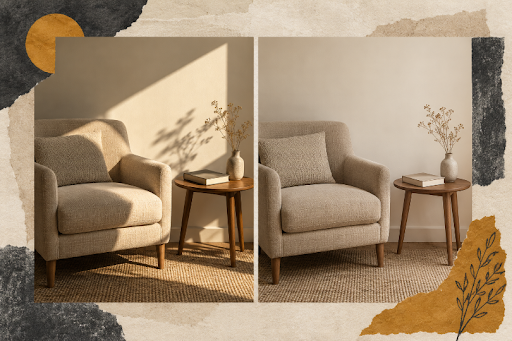
One person calls the room warm. Another calls it yellow. A third likes the chair but dislikes something they cannot name. The moodboard contains several attractive pictures, yet the discussion gives the designer no reliable instruction for the next version. Everyone has reacted to a different part of the scene.
Visual references become useful when they help people identify the decision they are making. For a lighting discussion, that means separating light direction, softness, and color from furniture preferences. A small set of controlled visual proposals can give a client something concrete to reject, which is often more useful than another invitation to describe their ideal atmosphere.
Find the Different Questions Inside One Reaction
Consider a hypothetical living-room brief. The client wants a quiet reading corner but keeps choosing pictures with dramatic sunlight. The designer interprets those choices as a request for strong contrast. The client may instead be responding to the pale wall or the spacious arrangement. Copying the whole reference would preserve the misunderstanding along with the attractive image. Ask the client to cover the chair in the reference and look at the wall alone. If the preference disappears, the lighting assumption needs revisiting before the designer spends another round developing it.
Ask what each reference contributes before building the next board. A client can point to a shadow, a bright wall, or the way a chair separates from the background. If the answer remains simply that the picture feels good, keep that reference as a broad preference rather than treating it as approval of every visible choice. The distinction saves later arguments about details nobody meant to approve.
A tool offering Nano Banana Pro can help make a visual proposal for that discussion. Google’s description of the model includes local editing and changes to scene lighting. Those capabilities make lighting alternatives a reasonable use to explore, but a generated room is still a proposal. It should not be presented as a calculation of how a particular fixture will illuminate a real space.
Turn Lighting Words Into Separate Visual Proposals
Choose a source picture the team is allowed to use and identify what should stay stable. For the reading corner, that could be the chair, side table, camera position, and wall color. Then describe one proposed lighting change. A soft wash across the wall asks a different question from a sharp patch of sunlight across the seat. Keeping those requests separate makes the response easier to interpret.
Kimg AI supports uploaded-image transformation, including changes to visual style. Use that starting point to explore the agreed lighting direction, then compare the output with the source. If the chair changes shape or the wall becomes a different color, the proposal no longer isolates the intended question. Set it aside or revise it before asking the client to choose.
Generation is not a controlled rendering pipeline that guarantees every other detail remains fixed. The designer must decide whether the differences are small enough for the discussion. A slight fabric variation may be tolerable when comparing broad light direction; a moved window may make the comparison useless. State that judgment in the working notes so the chosen image is not later mistaken for a precise design specification.
Do not label the proposals with persuasive adjectives such as luxurious or dull. Those words can steer the response before anyone looks closely. Simple neutral labels in the presentation are enough. Keep the original reference available separately so the client can explain whether the imagined improvement actually matters to them. An attractive edit is not automatically a better answer to the room brief.
Compare the Pictures Before Revealing the Intended Change
Present the alternatives at the same size and ask which better supports the reading corner. Let the client describe the reason before explaining the prompt behind either image. Its value is practical: the designer hears what the viewer noticed instead of receiving an echo of the vocabulary used to introduce the board.
Suppose the client chooses the softer image because the book would be easier to see. That is a more actionable response than warm. It gives the designer a functional priority to carry into the next stage. If the client instead chooses it because the chair looks more comfortable, inspect whether the generated version altered the chair. The vote may have answered a furniture question rather than a lighting question.
The same source can also be explored through Banana AI when a simpler illustrative treatment is sufficient. The useful comparison is between proposals the client can interpret, not between model names. Avoid showing a large wall of minor variations. Two meaningfully different directions leave room to discuss what caused a preference; a crowded board encourages quick selection without an explanation.
Kimg AI can provide candidate pictures for this stage, while the designer supplies the comparison discipline. Keep the rejected alternative alongside the selected one until the reason has been recorded. It may contain a useful constraint: no hard shadow across the reading surface, for example. That rejected detail can guide the next brief more precisely than the selected image alone.
Turn Rejected Lighting Into a Specific Design Requirement
A rejection should narrow the project. If the client dislikes glare on the table, record that specific concern rather than replacing it with a broad instruction to make the room softer. If the issue is a dark face in a seating area, note where the contrast becomes uncomfortable. The picture has served its purpose when it helps name a decision that can be addressed in the real design.
Separate the visual preference from the implementation question. A generated image cannot establish fixture output, electrical requirements, material reflectance, or the daylight entering a particular window. Those decisions need appropriate measurements and professional planning. Carry the approved visual intention forward as a brief, then check whether the actual room and available equipment can achieve it.
This separation also protects the client from approving an impossible combination. A scene might show abundant soft daylight in a room whose only window faces a shaded courtyard. The moodboard can still reveal a preference for diffuse illumination, but it should lead to a discussion of achievable lighting rather than a promise that the pictured daylight will appear. Keep that qualification attached to the design decision.
Approve a Lighting Intention With a Recorded Reason
Kimg AI is useful when a designer needs pictures that make a vague lighting conversation more specific. It is less useful when the team expects a generated scene to settle technical performance or guarantee the appearance of a finished room. The proposal should open a clearer discussion with those responsible for implementation.
Finish the review with one preferred direction and the reason it was chosen. A note about avoiding glare or keeping the reading surface bright is more durable than an unexplained favorite image. The board has done its job when the next design decision becomes easier to make.