Two hundred products, one developer, an afternoon of work: schema markup at that scale is manageable by hand. Fifteen thousand SKUs with variants, seasonal pricing, and stock that changes hourly is a completely different story.
A BigCommerce schema generator exists for exactly that reason, and it’s why so many mid-to-large retailers eventually stop writing JSON-LD by hand altogether. Below is a look at why manual markup stops holding up at scale, what automated schema actually does behind the scenes, and what’s worth checking before handing structured data over to a tool.
When Hand-Coded Schema Stops Being Realistic
Structured data is easy in theory. Write a Product block, drop it on the page, done. The trouble starts when that “one product” turns into thousands, each with its own price, availability, and variant combinations that shift week to week.
A Few Hundred Products Is Fine. A Few Thousand Isn’t.
A developer might code a clean Product schema for a hero page in an hour. Repeating that across an entire catalog and then going back every time a price drops or a color sells out isn’t really a coding problem anymore. It’s a maintenance problem, and maintenance is where most teams fall behind.
Prices and Stock Don’t Sit Still Long Enough
Product pages on an active BigCommerce store rarely sit still. Sizes go out of stock, prices shift for a weekend sale, new bundles get added mid-month. Markup written once and left alone doesn’t track any of that, so the structured data can end up showing information that stopped being true weeks ago.
How a BigCommerce Schema Generator Handles the Work
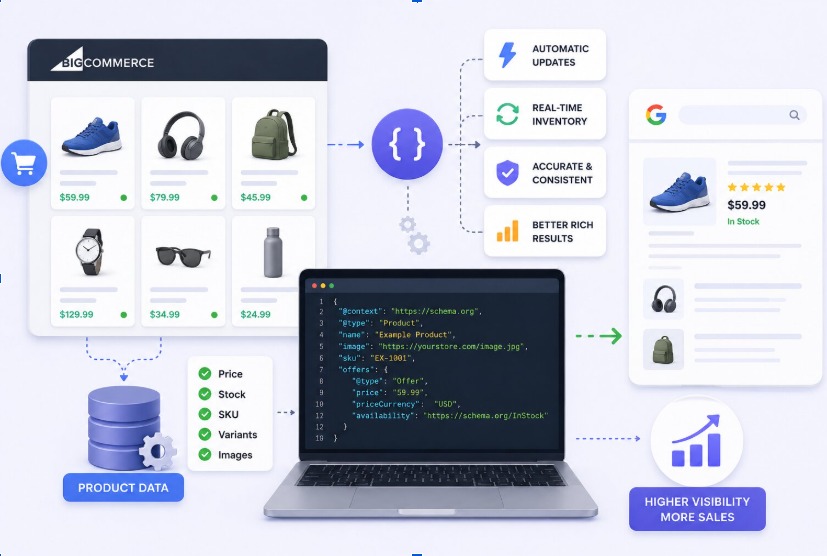
Rather than someone typing out JSON-LD product by product, a generator pulls live data straight from the BigCommerce catalog: name, price, SKU, stock status, images, and builds the markup automatically. A basic Product block looks something like this:
{
“@context”: “https://schema.org”,
“@type”: “Product”,
“name”: “Example Running Shoe”,
“image”: “https://example.com/images/running-shoe.jpg”,
“description”: “Lightweight running shoe with breathable mesh upper.”,
“sku”: “RS-1042”,
“brand”: {
“@type”: “Brand”,
“name”: “Example Brand”
},
“offers”: {
“@type”: “Offer”,
“url”: “https://example.com/products/running-shoe”,
“priceCurrency”: “USD”,
“price”: “79.99”,
“availability”: “https://schema.org/InStock”
}
}
Change the price on the storefront, and that same value updates in the schema without anyone touching code. That single detail is really the whole argument for automation.
Better Rich Snippets, Better Click-Throughs
Star ratings, price ranges, in-stock badges: these don’t just look nice, they take up more space on the results page. Structured data performance puts the click-through gap at roughly 35% higher for pages with valid schema compared to plain listings. Multiply that across a few thousand indexed product pages, and it stops being a minor bump.
There’s a newer angle too. Structured data isn’t required for visibility in AI Overviews or AI Mode, but Google still recommends keeping structured data accurate and aligned with the visible content on the page. For product sites, that means maintaining reliable product information across the page, structured data, and Merchant Center data rather than treating schema as a separate SEO layer.
Automation vs Doing It by Hand
Automation provides a more reliable and scalable way to keep structured data complete and consistent across large product catalogs.
Nothing Slips Through the Cracks
When schema comes from a template rather than someone’s memory, it’s easier to maintain consistent fields such as SKU and brand. That consistency matters more than it sounds. Missing a required property can prevent a page from qualifying for a particular rich result, while recommended properties can provide additional information and improve the quality of the markup.
Changes Show Up Without Anyone Chasing Them
Flash sales, restocks, discontinued lines: none of that runs on a schedule a content team can realistically match by hand. Automated schema reads current values at request time, so what’s in the markup matches what’s actually on the page, not what was true a month ago.
Not Every Schema Markup Tool Can Handle a Catalog This Size
Not every schema markup tool was designed with a five-thousand-SKU catalog in mind. Plenty handle a homepage and a few static pages fine but were never built to loop through variant combinations at scale. Before committing to one, it’s worth checking whether it supports the schema types and properties your catalog actually needs, including Product, Offer, AggregateRating, and BreadcrumbList, and whether it can maintain the relationships between those entities correctly.
Mistakes That Keep Showing Up in Large Catalogs
Missing required fields, duplicate IDs across variants, mismatched currency codes: these are the recurring problems in most large-scale schema audits. Google lays out the required and recommended properties for Product schema, and skipping even one recommended field is often enough to keep a page out of rich results.
A Few Things Worth Checking Before Automating Schema
A generator worth using validates its own output instead of just producing it. Running markup against the Schema.org vocabulary before it goes live catches type mismatches early, before they become a ranking issue. It’s also worth asking how a tool handles bulk category changes, since that’s usually the first place manual processes break down on catalogs this size.
Questions Store Owners Keep Asking
Does BigCommerce add schema markup on its own?
Some basic markup is built in, but it’s rarely enough for product-level rich results. Pricing, availability, and review data usually still need to be added separately.
How often does product schema actually need updating?
As close to real time as possible. Schema showing an old price or “in stock” on a sold-out item confuses both shoppers and search engines.
Can automated schema cause ranking problems if it’s wrong?
Yes, if the markup is misleading, that can trigger a manual action from Google. Automation actually lowers this risk since it pulls live data instead of relying on entries someone forgot to update.
Does having schema mean a page will get a rich result?
No, valid schema just makes the page eligible. Google still decides whether to actually show the rich result based on content quality and relevance.
Is automation overkill for a smaller store?
Often, yes. A few hundred products can usually be managed by hand without much trouble. The workload only becomes unmanageable once variants and categories start multiplying.