Okay so this actually happened to me. Few weeks back I’m messing around in TikTok settings, looking for something totally unrelated, and I land on this list called profile view history. There’s a name sitting in there I genuinely hadn’t thought about in years. Not gonna lie, my first reaction wasn’t curiosity, it was low key panic, because the next thought that hit me was wait, does that mean they can see I looked at their profile too.
Yes. They can. Unless you turn it off, which apparently a lot of people don’t even know is a setting that exists.
So I went and figured out exactly what this thing does, how to shut it off, and honestly a few things about it that aren’t obvious until you dig in a bit.
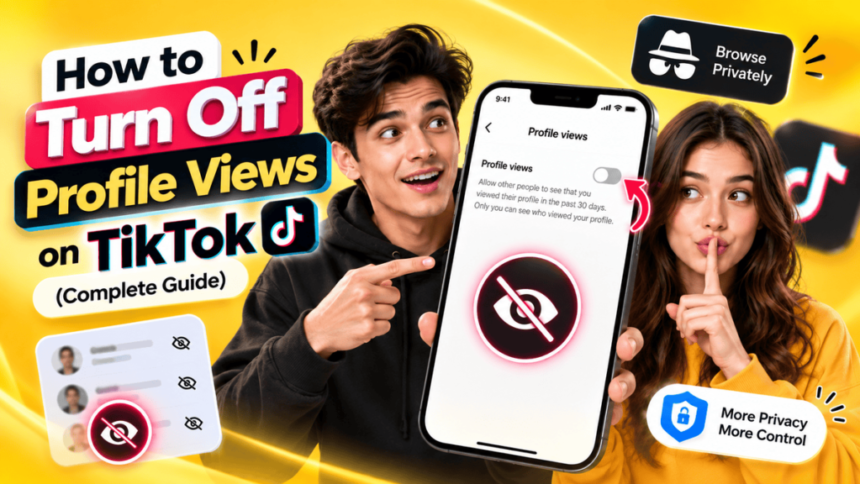
Short version if you’re in a rush: profile icon, three lines top right, Settings and Privacy, Profile Views History, flip the toggle. Done. If you want the actual explanation of what that toggle changes, keep going.
What TikTok Profile View History Actually Is
Think of it kind of like Instagram’s story views but for your whole profile instead of just one post. When you switch this on, TikTok starts keeping a log of accounts that stopped by your profile page, and shows you who they were for a limited stretch of time. Fair’s fair though, your visits to other people get logged the exact same way.
According to TikTok’s own support page on profile view history, you’ll only see profile views from accounts that have the setting turned on themselves, and the visibility only covers roughly the past 30 days before it resets. TikTok also notes this feature has age and follower based eligibility requirements, so not every account is even shown the option in the first place.
It’s opt in, which sounds simple until you realize what that actually means in practice. You flip it on hoping to see who’s been checking you out, and the second you do, you’ve also just agreed to let everyone else see when you check them out. A lot of people don’t clock that part until it’s too late and someone messages them going hey, did you look at my profile last night?
Not everybody even gets this feature the same way either. I’ve seen people say it just showed up one day after some update, others had to go digging through settings before it appeared at all. This isn’t exactly new behavior for TikTok either, they’ve pushed features out in waves like this for a while, region by region, so whatever your settings menu looks like might not match your friend’s, depending on the app version or where you are.
What Happens When You Turn Off TikTok Profile View?
This is really the part everyone actually wants to know. Two things happen at once, basically instantly. First, your own “who viewed me” list just stops populating, goes blank and stays blank. Second, and this is the bit people forget about, your own visits to other profiles stop getting logged too. You go invisible in that one specific way. No notification goes out, no little record sitting anywhere saying you stopped by.
What it doesn’t do though, and I want to be really clear on this because I got it wrong myself at first, is touch anything else on your account. Doesn’t delete anything. Doesn’t hide your videos. Doesn’t make your account private. Doesn’t stop people finding you through search or hashtags. It’s genuinely just this one narrow thing. Your followers still see everything you post like normal, your comments still show your name, your likes are still public if your account already was.
Why People Actually Turn This Off
There’s a bunch of reasons floating around and honestly most of them make sense. Some people just don’t love being tracked, even for something this minor, which, fair enough, that’s a reasonable instinct. Others are checking out a competitor, or an ex, or just some random account they’re curious about, and they’d rather not leave a trail while they do it. And then there’s people who just find the whole concept a little creepy and would rather not be part of it either direction.
Creators run into this a lot too, for a slightly different reason. If you’re scoping out what other people in your niche are posting, or checking their numbers, you probably don’t want them noticing you’ve been on their page five times this week. Brands doing competitor research have the exact same issue, nobody wants a rival account knowing exactly how often they’re being watched.
There’s also this weird case with shared devices. Parents managing a kid’s account, or a couple sharing one phone, sometimes just flip it off entirely because the view history ends up looking like some erratic pattern that doesn’t actually represent anyone’s real behavior, since it’s really two or three different people using one account.
Turning It Off, the Actual Steps
- Open the TikTok app on your phone.
- Tap Profile in the bottom right corner.
- Tap the three line menu icon in the top right corner.
- Select Settings and Privacy.
- Tap Privacy.
- Scroll down and tap Profile Views History (some versions list it as Viewers).
- Toggle off Profile View History.
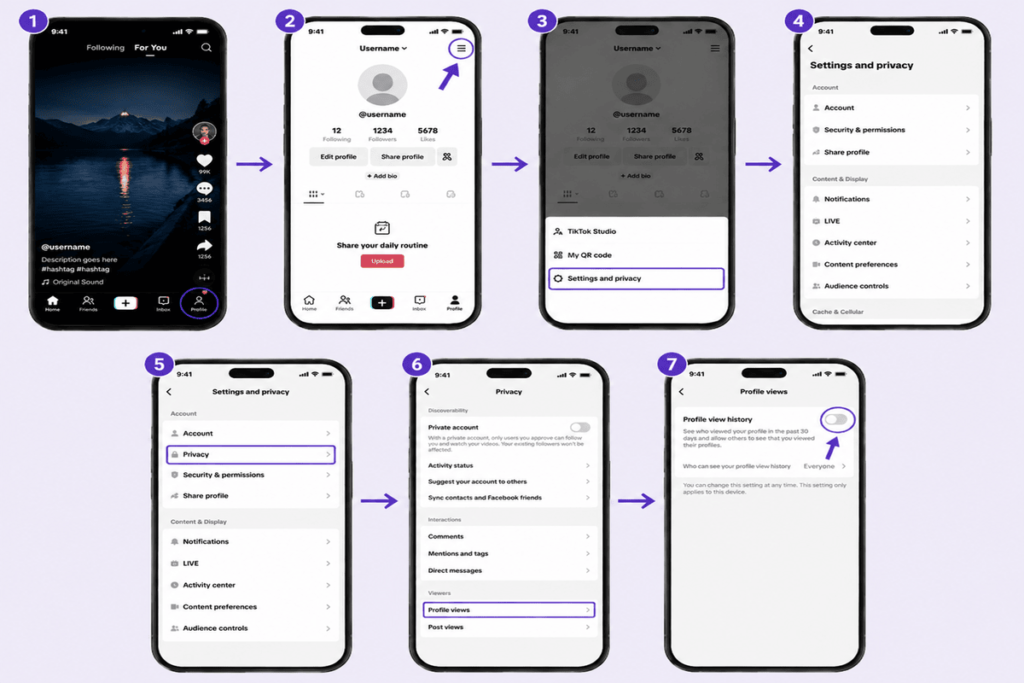
That’s the whole process on mobile, and it applies right away, no waiting period. TikTok usually shows a quick confirmation letting you know both your history and your visibility to others are switching off together.
If you’re doing this through a browser instead of the app, the steps are basically the same, just navigate through your account settings on the website version and you’ll land in the same Privacy section.
Mistakes People Keep Making With This Setting
Biggest one, by far, people assume turning this off also makes their account private. Nope, completely separate settings. If you actually want your content hidden from non followers, that’s the Private Account toggle, different switch entirely, doesn’t overlap with this one at all.
Second mix up worth mentioning, people figure flipping this off wipes out whatever history was already sitting there. Not exactly. The feature just stops from that point forward, older views that got logged before might stick around a bit longer on the other end till it clears out on its own.
Third thing worth knowing, some people assume turning this off means zero trace anywhere, including on business or verified accounts running their own analytics. That’s not really the same system. Regular profile view history and business account insights work differently under the hood, so certain professional accounts might still be tracking visitor data through their own tools even with your personal toggle switched off.
Does This Touch Anything Else on Your Account?
No, and I keep having to repeat this because it trips people up constantly. Follower count stays exactly the same. Video view counts, likes, comments, all untouched. People can still comment on your stuff, duet it, stitch it, find you through search like normal. This setting really does live in its own little box separate from everything else.
If you’re checking broader account activity, a TikTok profile analyzer can give you a separate look at public profile metrics.
If what you’re actually after is broader privacy though, hiding stuff from non followers, controlling who can DM you, blocking duets or stitches, those live as their own toggles inside that same Privacy menu. Worth poking through them individually if privacy in general is really what you’re going for here, not just this one feature.
Frequently Asked Questions
What happens when you turn off TikTok profile view?
You stop seeing who’s checking out your profile, and at the same time your own visits to other people stop getting recorded anywhere. It goes both directions at once, not just one side.
Does turning off profile views make my TikTok account private?
No, these are two totally different settings. Turning off view history doesn’t hide your videos or restrict who sees your profile, you’d need the separate Private Account setting for that.
Can I hide my visits from just one person instead of everyone?
Nope, it’s all or nothing here. There’s no way to selectively block one account from seeing your visits while leaving it on for others. Either everyone sees it or nobody does.
Will someone know I visited before I turned this off?
Maybe. If that view already got logged before you disabled the feature, it could still be sitting there on their end a little while longer until it naturally clears out of TikTok’s system.
Do business accounts still see visitor data even after I turn mine off?
Turning off your personal profile view history stops your own visits from being tracked, and stops you seeing anyone else’s too. That said, business and creator accounts sometimes run their own separate analytics tools, so worth checking that separately if it’s something you care about.
Can I see who viewed me without letting anyone see that I viewed them?
Nah, not how it’s set up. Whole thing works both ways at once, there’s really no way to peek without also showing up on their end.
Final Thoughts
Really this whole setting boils down to one specific thing, mutual visibility between you and whoever you’re checking out. Flip it off and both sides go dark, you can’t see them, they can’t see you. But it stops there. Doesn’t touch your privacy settings, your content, or anything else about how your account behaves day to day. If actual privacy is the goal, worth pairing this with the other settings TikTok gives you rather than assuming this one covers everything on its own.