If you’ve been shopping for disposable vapes recently, you’ve probably noticed something new: a small screen on the device. It’s not just for show. That display gives you live information about your device — and once you understand what it’s telling you, it changes how you shop.
This guide breaks down exactly what each type of screen displays, which devices have them, and how to use that information to pick the right vape for your needs.
What’s Driving the Screen Trend?
The jump to higher puff counts is the main reason. Early disposables topped out at 300–600 puffs. Today’s devices offer 5,000, 10,000, even 20,000 puffs — with larger batteries and more e-liquid to match.
At that scale, you need a way to track what’s left. A screen solves that problem directly. It’s a practical response to a practical need. Brands added screens because users kept running out of battery or e-liquid without warning. That’s a bad experience — and a reason to switch brands.
What Does a Disposable Vape Screen Actually Show?
Not every screen shows the same information. Here’s a clear breakdown of what you’ll find across current models.
1. Battery Level
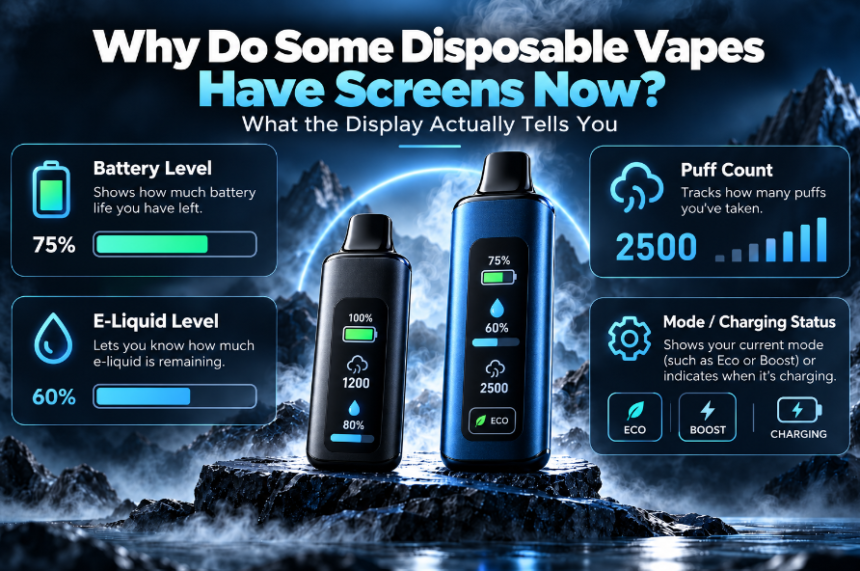
The most common display feature. Shows how much charge remains — usually as a percentage (e.g., 75%) or a segmented bar.
Why it matters when buying: If you want a rechargeable disposable, a battery indicator is essential. Without it, you’re guessing when to plug in. Most 5,000+ puff devices are rechargeable via USB-C, and a screen helps you keep the battery above zero so you never get cut off mid-session.
2. E-Liquid Level
Shows how much vape juice is left inside the tank — typically as a percentage or a visual fill indicator.
Why it matters when buying: This is the feature most users wish they’d had on older devices. A low e-liquid warning prevents the burnt, dry hit you get when the tank runs empty. It also tells you when to reorder — before you run out, not after.
3. Puff Counter
Tracks how many puffs you’ve taken, either counting up from zero or counting down from the rated maximum.
Why it matters when buying: Puff counts on the box are estimates based on 1–2 second puffs. Your actual usage varies. A puff counter gives you a real number based on how you vape. It’s also useful if you’re monitoring your nicotine intake or trying to pace yourself throughout the day.
4. Power Mode or Wattage Display
Some disposables let you switch between output levels — typically a standard mode and a higher-power mode. The screen shows which mode is active.
Why it matters when buying: Higher power delivers stronger flavor and bigger vapor. Lower power is easier on battery and e-liquid, making your device last longer. If you vape heavily throughout the day, a power mode display helps you manage consumption. If you prioritize flavor above all else, you’ll want to know you can push it higher when it counts.
Devices that have it: Geek Bar Pulse is the most well-known example, with its “Pulse Mode” and “Regular Mode” toggle. Then Raz DC25000 started the Normal mode and Boost mode. Lost Mary MT15000 Turbo started the Turbo mode and smooth mode…Very creative.
- Multi-Stat Combo Display
The most advanced option. These screens show battery level, e-liquid level, puff count, and power mode — all at once, often with animations or color indicators.
Why it matters when buying: If you want full visibility with no guesswork, this is it. Premium devices with combo screens typically cost a little more, but you get complete control and awareness in return. They’re also harder to fake — a brand confident enough to show you every stat in real time is usually confident in their product quality.
Screens vs. No Screens: Which Should You Buy?
Here’s a direct comparison to help you decide.
| Feature | Screen Vape | No-Screen Vape |
| Battery visibility | ✅ Clear percentage or bar | ❌ Guess based on LED color |
| E-liquid tracking | ✅ Live readout | ❌ No indicator |
| Puff monitoring | ✅ Accurate counter | ❌ Estimate only |
| Price point | Slightly higher | More budget-friendly |
| Best for | Daily users, high-puff devices | Casual users, short-term use |
If you’re using a 300-puff device for occasional use, a screen isn’t necessary. But if you’re relying on a 5,000–20,000 or more puff device day-to-day, a screen makes a genuine difference in how long your device lasts and how well you manage it.
What the Screen Won’t Tell You
Screens are useful, but they have limits worth knowing before you buy.
- Puff counts are estimates. The counter tracks activations, not actual volume inhaled. Long draws use more e-liquid per puff than short ones.
- E-liquid readings can lag. Some sensors update in steps rather than continuously. A sudden drop from 30% to 0% is possible on lower-end devices.
- Screen quality varies by brand. A sharp, accurate display on a Geek Bar or Raz vapes is not the same as a dim, slow-updating screen on a generic knockoff.
Check the brand before you buy. Screens are only as trustworthy as the device they’re on.
How to Use Screen Info to Get More From Your Device
- Charge before it hits 20%. Letting the battery drain completely shortens its lifespan over time.
- Switch to lower power when you’re at 30% e-liquid or less. It reduces the risk of dry hits.
- Use the puff counter as a reorder trigger. If your device is rated for 6,000 puffs and you’re at 4,500, order your next one now — not when it’s already dead.
Final Thought
A screen on a disposable vape isn’t a gimmick. It’s a practical tool that shows battery level, remaining e-liquid, puff count, and output mode—the four things that determine whether your device performs or disappoints.
If you’re comparing two similar disposables and one has a screen, that’s meaningful information. It means the brand is being transparent about your device instead of leaving you to guess. For daily users especially, that visibility directly affects how much value you get from every device you buy.
Shop smarter: check the screen specs before you check out.